
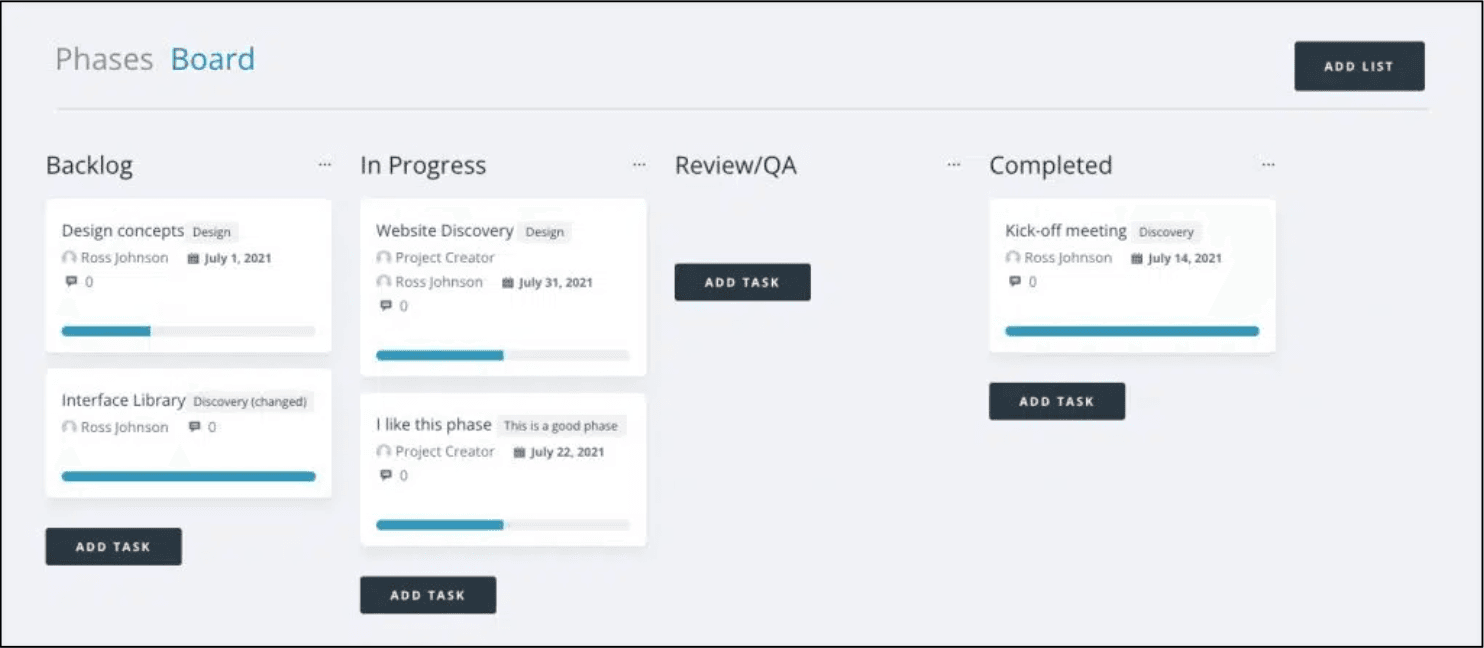
Agencies juggle deadlines, clients, revisions, and moving parts. A Kanban board inside WordPress gives teams a clear, visual way to organise work and maintain momentum without switching between tools. This guide compares the top Kanban board plugins for WordPress and helps you choose the right solution for your agency.
A Kanban board WordPress plugin adds a visual drag and drop task board to your site so you can organise workflows, track progress, and manage projects more clearly.
What Is a Kanban Board (and Why Use One in WordPress)?
Visual Workflow at a Glance
A Kanban board shows tasks in columns like To Do, In Progress, and Done. It allows teams to see project status instantly without digging through long lists or threads.
A Better Way to Manage Tasks and Deliverables
Dragging cards between stages keeps workflows simple and intuitive. It reduces confusion and gives every team member a shared understanding of where work stands.
Why Agencies Prefer Kanban for Client Projects
Agencies often handle multiple timelines and stakeholder expectations. A Kanban board helps teams prioritise, reduce bottlenecks, and keep client deliverables on track.
What to Look for in a WordPress Kanban Board Plugin
Drag and Drop Cards and Columns
Smooth drag and drop movement is essential for building a board that feels natural and easy for teams to use.
Task Assignments and Due Dates
Agencies need clarity on who is doing what and when tasks are due. Assignments and due dates help keep projects accountable.
Progress Indicators and Status Updates
Visual progress bars and clear statuses reduce back-and-forth communication and help teams stay aligned.
Client Friendly Visibility Options
Some teams need clients to follow progress without exposing internal notes. Good permission controls make this possible.
Integrations with Project Management Tools
Connections with other tools can reduce double handling and streamline internal processes.
Best Kanban Board WordPress Plugins (Full Comparison)
Project Panorama Kanban
Project Panorama Kanban gives agencies a fully integrated Kanban experience inside the Panorama project dashboard. Tasks appear as visual cards that move through defined stages, with each card tying into overall project progress. It is designed for client visibility, predictable delivery, and clear communication. Panorama also includes milestones, timelines, progress tracking, and client friendly summaries, making it a strong choice for agencies needing boards plus structured project clarity.
Kanban for WordPress
Kanban for WordPress is one of the most established solutions for adding a Kanban board to your site. It includes drag and drop cards, custom columns, user assignments, and workflow controls. The plugin is simple and focused, making it suitable for teams wanting a lightweight board for everyday tasks.
WP Project Manager
WP Project Manager Kanban includes an integrated Kanban board in its Pro version. Tasks appear as cards that you can drag between stages, making it a good option for teams already using WP Project Manager for broader project oversight.
FluentBoards
FluentBoards is a modern and fast Kanban solution from the Fluent team. It includes clean board layouts, assignments, due dates, checklists, and an intuitive interface. Its recent growth and active development make it a strong competitor for agencies wanting a more contemporary experience.
UpStream (with Kanban Extension)
UpStream Kanban Extension adds a Kanban view to the main UpStream project management plugin. The extension supports drag and drop cards and structured workflow columns, which helps agencies manage more complex or multi-stage projects.
Feature Comparison Overview
A high level comparison of the core features offered across the main plugins:
- Drag and drop cards
- Custom columns and statuses
- User assignments and due dates
- Client visibility options
- Integrations
- Pricing differences
- Ease of use
- Ideal use cases
All listed plugins support basic visual task management, but each offers different strengths depending on your agency’s workflow.
How Agencies Use Kanban Boards Inside WordPress
Keep Internal Tasks Organised
Agencies use Kanban boards to manage design tasks, content production, development work, and approval steps. Everything stays organised in one place.
Prevent Bottlenecks and Overdue Work
Seeing too many cards stuck in one stage helps teams intervene early and rebalance workloads before deadlines are affected.
Give Clients a Clear Progress Snapshot
When used with controlled permissions, a Kanban board can provide transparent progress updates without exposing internal details.
Reduce Back and Forth Communication
Visual progress reduces the need for long check-ins, status emails, or weekly reporting. Teams spend more time delivering work and less time updating spreadsheets.
Kanban vs Traditional Project Timelines
When a Board Works Best
Kanban is ideal for ongoing work, support tasks, or flexible-scope projects where tasks flow continuously.
When a Timeline Is Clearer for Clients
Timelines work best when you need to communicate major milestones, dependencies, and deadlines.
Why Some Teams Use Both (Hybrid Approach)
A hybrid approach gives teams an internal daily workflow tool while giving clients a high-level timeline. This improves clarity without extra admin work.
How to Add a Kanban Board to WordPress using Project Panorama
Install the Plugin
- In your WordPress dashboard, go to Plugins → Add New
- Search for Project Panorama
- Install and activate the plugin
- Add the Kanban add-on from your Panorama account if needed
Configure Boards and Workflow Settings
Navigate to Panorama → Kanban to create your first board. Add columns that match your workflow, such as Backlog, In Progress, Review, and Complete.
Add Tasks and Assign Owners
Create cards for each task. Assign responsibilities, set due dates, and add details or attachments as needed.
Enable Client-Friendly Views
Configure visibility so clients can follow progress while internal notes stay private. Panorama offers a structured permission system to help you manage this easily.
For more setup details, see the official Kanban setup guide.
When Your Kanban Needs More Than Just Boards
Status Tracking and Milestones
Kanban is excellent for daily execution, but larger projects often need milestone tracking to show high-level progress.
Document Sharing and Approvals
Agencies often need integrated file sharing and approval systems, which most standalone Kanban plugins do not provide.
Automated Client Updates
Clients appreciate concise, automated updates that summarise progress without needing board access.
Why Agencies Often Upgrade to Progress Driven Tools
As teams grow, they typically need tools that combine visual task management with timelines, reporting, client summaries, and progress tracking. Panorama provides all of these in one platform.
FAQs
Q: Can clients safely view a Kanban board in WordPress?
A: Yes. Most plugins provide permission controls that allow you to share progress while hiding internal details.
Q: Is there a free Kanban board plugin for WordPress?
A: Kanban for WordPress offers a free version, and some other plugins offer limited free tiers.
Q: Do Kanban boards replace project timelines?
A: No. They complement each other. Kanban handles daily work while timelines show the big picture.
Q: Which plugin is best for agencies?
A: Agencies often prefer tools that combine Kanban with timelines, milestones, and client communication. Project Panorama is purpose built for that.
Bring Clarity to Your Projects
If you want every client to understand where their project stands without long emails or status meetings, Project Panorama gives you the clarity you need.
Show progress visually, communicate expectations clearly, and run every project with more confidence.